REVIEW · QUEENSTOWN
Omni VR – Multiplayer Virtual Reality
Book on Viator →Operated by Thrillzone · Bookable on Viator
Queenstown just got stranger. Omni VR turns you into the runner in a multiplayer virtual arena, where you trade real-world sights for game worlds and talk to your team through the headset.
The two things I really like are the physical “run” mechanic and the choice of game types, so you’re not stuck doing one thing the whole time. One thing to consider: it’s a short session (about 40 minutes), so you’ll want to be ready to make the most of your time and check the height (1.40–1.95 m) and weight (max 130 kg) limits first.
At Thrillzone Queenstown, this is the kind of activity that works especially well when you want something fun that doesn’t depend on the weather. And if you’re traveling with kids, staff guidance matters, with hosts helping families pick games that fit ages.
In This Review
- Quick hits before you go
- Omni VR at Thrillzone Queenstown: what you’re signing up for
- Where it starts: Thrillzone Queenstown and your 40-minute rhythm
- Game variety: zombies, haunted quests, and tactical missions
- Multiplayer play: why the headset speakers are a big deal
- The running shoe mechanic: the thrill and the reality check
- Staff support at Thrillzone: fast setup, real help
- Price and value: is $40.34 for 40 minutes fair
- Best times to book: Queenstown timing and availability
- Who should go (and who should check the limits)
- Making it part of your Queenstown day
- Should you book Omni VR multiplayer VR in Queenstown?
- FAQ
- How long is Omni VR – Multiplayer Virtual Reality in Queenstown?
- What’s included in the ticket price?
- Can we talk to each other during the game?
- Are there height and weight requirements?
- Is there a limit on group size?
- Can I get a full refund if my plans change?
Quick hits before you go
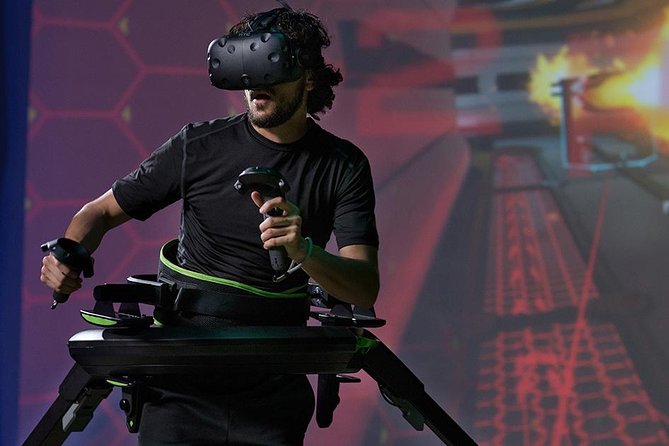
- Run while you play using Omni VR’s special shoes that sync your steps to the virtual action
- Multiplayer voice chat through speakers built into the headsets, so teamwork is actually possible
- Pick your game style from options like zombie apocalypse, haunted house, or shooting missions
- All gear provided, so you’re not packing straps, controllers, or anything techy
- Small bookings (max 4 travelers) which typically makes setup feel smoother and more personal
- Helpful staff support, including age-appropriate game guidance, with team members like Bea, Paige, and Nic highlighted in past experiences
Omni VR at Thrillzone Queenstown: what you’re signing up for
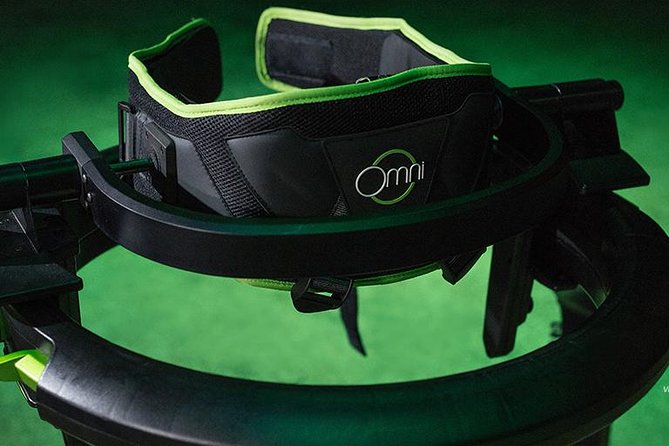
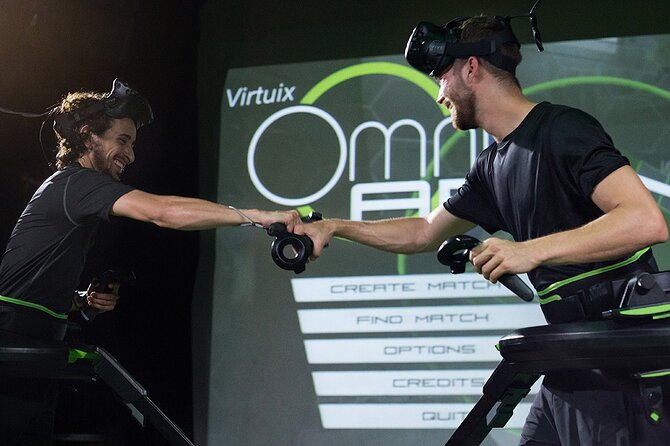
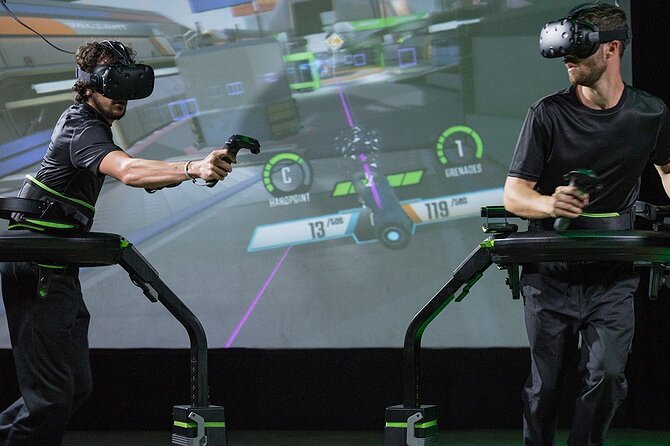
Omni VR is a multiplayer virtual reality experience that’s built around movement. You’ll put on a VR headset and step into a special setup designed to make you feel like you’re running through the game. Instead of standing still while you wave controllers, you’re expected to move your feet like you mean it.
You can choose how you want to play, too. The experience supports single player and multiplayer, so you can team up with friends or compete against each other. And because the headsets have integrated speakers, you can talk in the moment, which makes missions feel less like a solo video game and more like an active group challenge.
This is also one of those “small-venue, big-energy” activities. It’s happening at Thrillzone Queenstown, and the vibe is less about fancy scenic stops and more about getting into the action fast.
You can also read our reviews of more tours and experiences in Queenstown.


Where it starts: Thrillzone Queenstown and your 40-minute rhythm
Your session starts at Thrillzone Queenstown, 53 Shotover Street. The activity ends back at the same meeting point, so you’re not bouncing around town to different locations.
Plan for a fairly tight experience flow. The total time is about 40 minutes, which includes the setup and the game time. That’s a good thing if you like activities that don’t eat your entire day, but it means you should treat it like a sprint, not a long afternoon hang.
In practice, here’s what you should expect once you arrive:
- You check in with the team and get fitted for the VR headset and running shoes (gear is provided)
- You get guidance on how to move inside the play zone and how the game is controlled
- You select from the available game options with staff help
- You play, using headset speakers to communicate if you’re in multiplayer
- When time is up, you wrap back where you started
That “setup first, then run” pacing is part of what makes the experience accessible. The hosts are used to helping people get going quickly, including families who may need age-appropriate game suggestions.
Game variety: zombies, haunted quests, and tactical missions
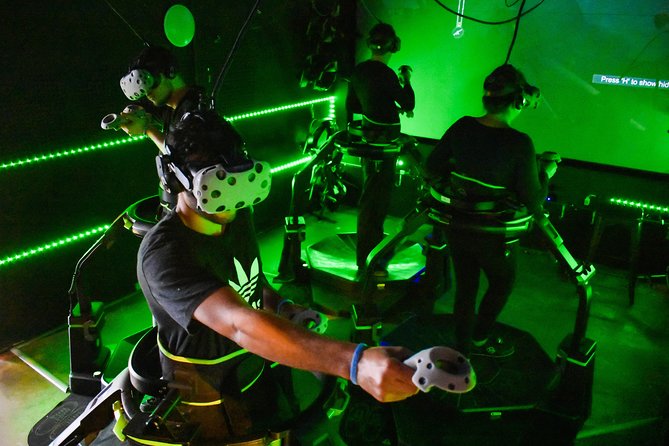
One of Omni VR’s best qualities for real life planning is variety. You’re not locked into one scenario. Instead, you get a selection of different games, and the options can range from zombie apocalypse themes to haunted house experiences, plus shooting mission style games.
For you, that variety matters because it changes the social dynamic. Horror-leaning games are often better for shared “we’re in this together” energy, while shooting missions can feel more competitive, even when you’re grouped. If you’re traveling with a mixed group—say, one person who wants action and another who wants something spookier—game choice helps everyone feel included.
A practical way to use this: if you’re choosing between multiple games, think about your group’s mood and stamina. Because the experience is based on running, you’ll probably enjoy the session more if you pick a game you’re comfortable moving through, not just one with the coolest logo.
Multiplayer play: why the headset speakers are a big deal
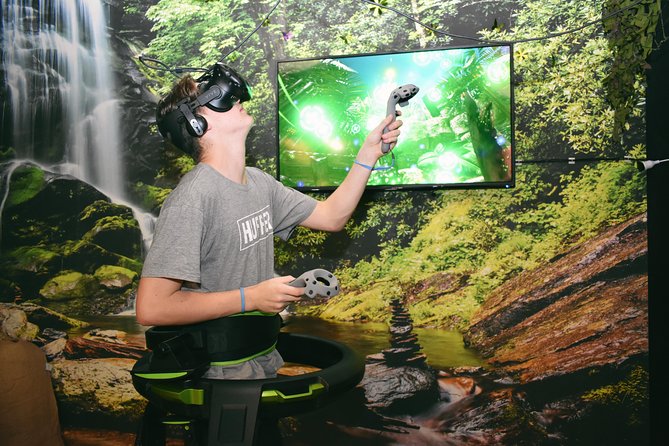
A lot of VR experiences are “fun until you need to coordinate.” Omni VR solves that with speakers integrated into the headsets, so you can talk to each other while you play.
That changes how you strategize. If you’re competing, you can call out enemy positions or warn teammates about what’s coming next. If you’re teaming up, you can share timing, coordinate moves, and regroup without removing your headset. You’re basically keeping the conversation inside the game world.
Also, it’s easier on the group. You don’t need to shout across a room, and you don’t need to pause and mime directions. The voice setup is especially useful for families or friend groups that want to keep everyone engaged, including people who might not be as confident at VR.
The running shoe mechanic: the thrill and the reality check
Omni VR is famous for the fact that you physically run as part of gameplay. You’ll wear special shoes designed to connect your movement to what’s happening virtually, so your mind buys the illusion that you’re sprinting through game spaces.
I love that it makes VR feel active. It’s not just watching. You’re doing the motion, which makes the experience more memorable and more “you’re in it” than typical screen-based games.
But the reality check is simple: you need to be able to move. This isn’t a chair experience. There are also clear physical requirements:
- Height must be between 1.40 m and 1.95 m
- Weight must be 130 kg max
If you’re near the limits, I’d treat that as a go/no-go decision, not something to hope for. The experience is designed around fitting you into the system properly.
For anyone who’s sensitive to fast movement games, your best move is to communicate that to staff during setup. They’re used to adjusting the experience based on comfort and age needs.





Staff support at Thrillzone: fast setup, real help
Even the best VR tech can feel frustrating if setup takes forever. One of the repeatedly praised parts of this experience is how helpful the team is during the process.
Past visitors have called out that staff walk you through everything and stay close through the session. That matters because small problems—like confusion about movement, or picking a game that fits your group—can turn a fun session into an awkward one if you’re left on your own.
I’ve also seen specific names come up for making a difference, including Bea, Paige, and Nic. That suggests consistent, hands-on support rather than a “press start and good luck” approach.
For you, the practical takeaway is to ask questions early. When you’re deciding between games, tell the team who’s playing and what vibe you want. If you’re bringing kids, ask for age-appropriate options. The team has shown they’ll help match games to your group.
Price and value: is $40.34 for 40 minutes fair
At $40.34 per person, Omni VR isn’t the cheapest activity in Queenstown. And if you’re used to paying for longer tours, the short duration can feel a bit punchy.
Still, value depends on what you compare it to. You’re paying for:
- VR equipment (headset and special running shoes) provided for you
- A guided setup and staff support
- A multiplayer game experience (not just a solo ride)
- Game variety within a single session window
One reviewer noted it can feel expensive, which is fair. But if you treat it as a high-energy rainy-day plan or a “try something different” add-on during your trip, the cost can start to make sense.
If you’re deciding whether to book, I’d think in terms of your group’s enjoyment. If you’ve got active people who want to play together, this tends to land well. If you’re mainly looking for calm sightseeing time, it’s probably not your best use of $40-plus.
Best times to book: Queenstown timing and availability
This is the kind of attraction people plan around, especially when the weather turns. On average, it’s booked around 6 days in advance, so it’s smart to lock in your preferred slot ahead of time if you’re traveling in a busier period.
Also remember the group cap for this booking is up to 4 travelers. Smaller capacity can mean your choice of timeslots may shrink faster than you expect. If you’re traveling as a family or a small group, booking early helps you avoid “all the fun times are gone” frustration.
Who should go (and who should check the limits)
Omni VR is a strong fit if you like active games, group challenges, and something you can’t replicate at home. It’s also a good option for mixed ages, as staff help with selecting games that work for kids and adults together.
You’ll likely enjoy it most if:
- Your group wants to play, not just watch
- You want a rainy-day activity in Queenstown that stays entertaining
- You’re comfortable doing physical movement for a short time
- You appreciate guided support and clear instructions
You should think twice if:
- You fall outside the height or weight limits
- You dislike games that require running and quick movement
- Your group wants a longer, slow-paced experience
And if you have questions about your situation, it’s worth checking directly before you arrive. Small fitting details matter here because the shoes and play zone are part of the system.
Making it part of your Queenstown day
Thrillzone Queenstown is a convenient stop if you want a break from going back and forth between viewpoints. It’s on Shotover Street, and it’s described as near public transportation, which can save you time when you don’t want to drive for every activity.
If you want to turn it into a full indoor-outdoor plan, consider scheduling Omni VR as an afternoon anchor. That way, you can be flexible with the rest of your itinerary depending on weather.
And if you’re the type who likes stacking activities, the venue offers more than just Omni VR. You might find yourself tempted to add another attraction like a VR escape or other games on-site, since people often revisit the place and try multiple options in one trip.
Should you book Omni VR multiplayer VR in Queenstown?
I’d book Omni VR if your group wants a fun, active, voice-chatting game experience in a small venue. The running shoes, the ability to team up, and the staff guidance are the core reasons this is worth your time. The overall rating is strong, with 95% recommending it and an average rating of 4.7 from 20 reviews, which matches what you’re actually paying for: guided play, not just tech.
I’d hold off if $40-plus for about 40 minutes feels too steep for your budget, or if your group doesn’t want to move much. Also, don’t ignore the height (1.40–1.95 m) and weight (max 130 kg) limits. Those aren’t minor details here.
If you’re on the fence, here’s my simple rule: if you’ll actually run and laugh with your group, it’s a yes. If you want quiet sightseeing, choose something else.
FAQ
How long is Omni VR – Multiplayer Virtual Reality in Queenstown?
The experience runs for about 40 minutes.
What’s included in the ticket price?
Your booking includes all gear provided, including the VR headset and the special shoes.
Can we talk to each other during the game?
Yes. The VR headsets have integrated speakers, so you can communicate while completing missions.
Are there height and weight requirements?
Yes. The height limit is min 1.40 m and max 1.95 m, and the weight limit is 130 kg max.
Is there a limit on group size?
Yes. This activity has a maximum of 4 travelers.
Can I get a full refund if my plans change?
Yes. You can cancel for a full refund up to 24 hours in advance of the experience start time.